Data Providers for AI Agents: How to Choose a Live Data Feed (2026)
Business-data API, self-serve web data API or managed feed? How to choose a data provider for your AI agent by freshness, delivery and who fixes it when a source changes, with a 10-point checklist.
By Chirag Jakhariya, Co-founder & CEO · · 12 min read
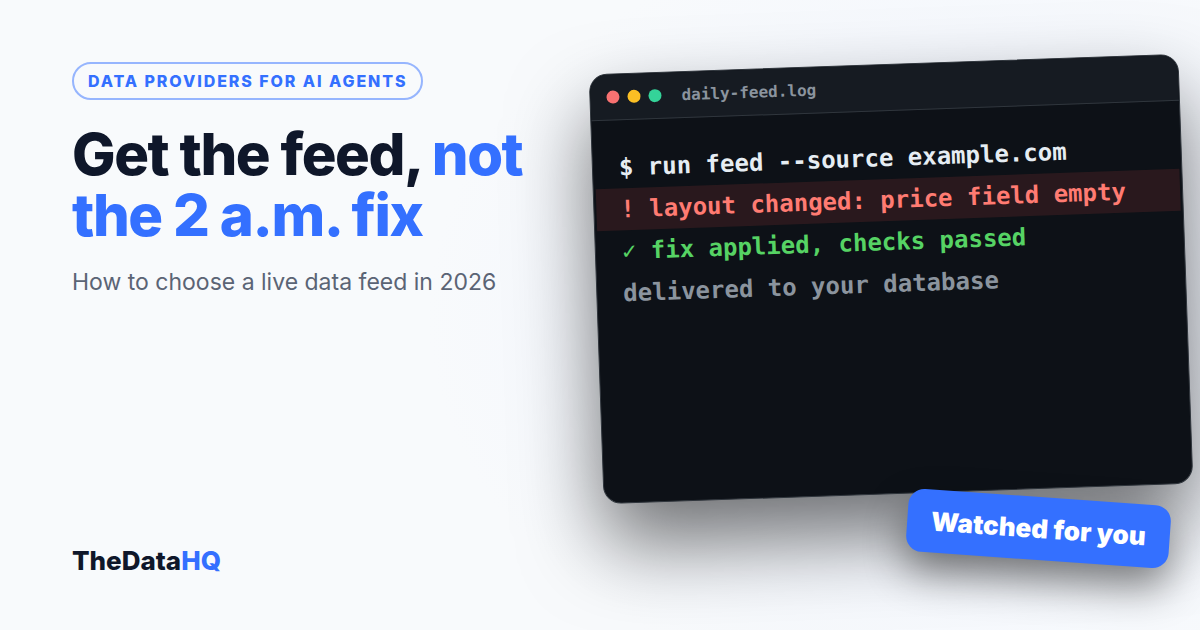
Data providers for AI agents come in three kinds: business-data APIs that sell company and contact records, self-serve web data APIs that fetch pages when your agent asks, and managed feeds where a team collects, checks and delivers the data you named on a schedule. Pick by what your agent needs to know, how fresh it must be, and who you want fixing it when a source changes.
What do data providers for AI agents actually deliver?
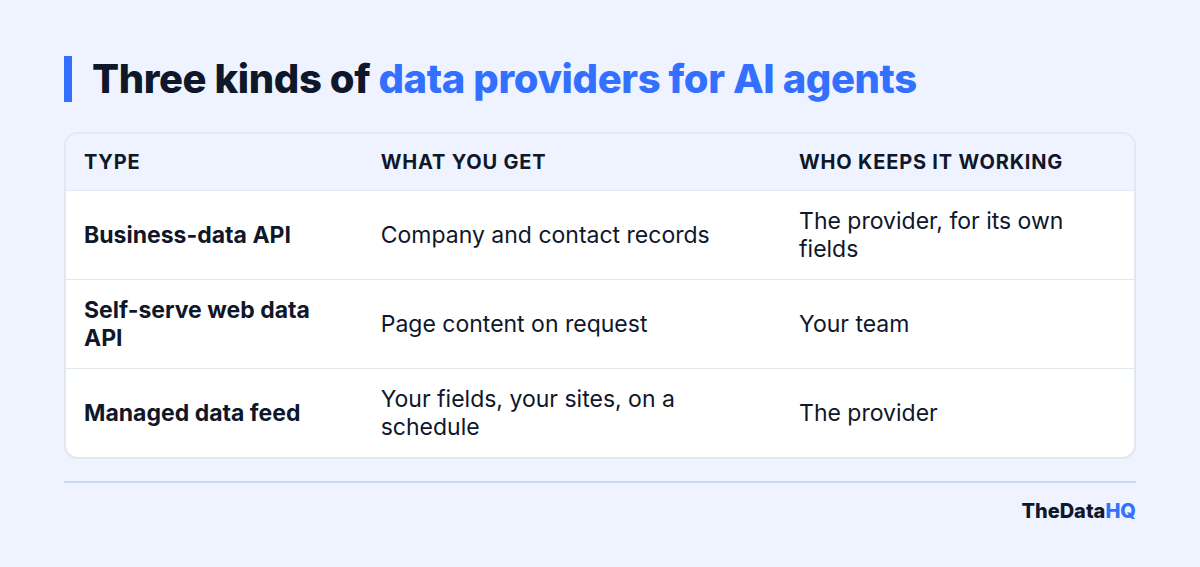
They give your agent facts it can't know on its own: today's prices, open jobs, new listings, company changes. The three kinds deliver those facts in very different ways.
| Provider type | What you get | Who keeps it working | Best for |
|---|---|---|---|
| Business-data API | Company and contact records from the provider's own database | The provider, for the fields it already sells | Sales and research agents that need firmographics |
| Self-serve web data API | A page's content as text or JSON, fetched when your agent asks | Your team: prompts, parsing, checks and failures | Agents that read many different pages once |
| Managed data feed | The exact fields you named, from the sites you named, on a schedule | The provider: collection, checks and fixes | Agents that rely on the same sources every day |
Most "best data providers for AI agents" lists rank the first kind, because the people writing them sell it. Coresignal's 2026 guide, for example, compares company and employee data sources. That's useful if you need firmographics. It doesn't help if your agent needs a competitor's prices this morning.
Which type of provider fits your agent?
Start from the question your agent answers. The data source follows from that.
Sales and research agents
An agent that qualifies leads or briefs a rep needs company size, industry and location. A business-data API is usually the right first stop, because those records already exist.
Pricing, listings and market agents
An agent that answers "who undercut us today?" or "what's new on the market in Austin?" needs data that no database holds yet. It has to come off public websites, often the same 20 or 200 sites every day. That's the job a managed feed is built for.
Open-ended research agents
An agent that reads whatever page a user points it at needs a self-serve web data API. You can't schedule a feed for pages nobody has named yet.
Many teams end up with two of the three. A common mix is a business-data API for company records plus a managed feed for the fast-moving web data.
Why does freshness matter more for an AI agent?
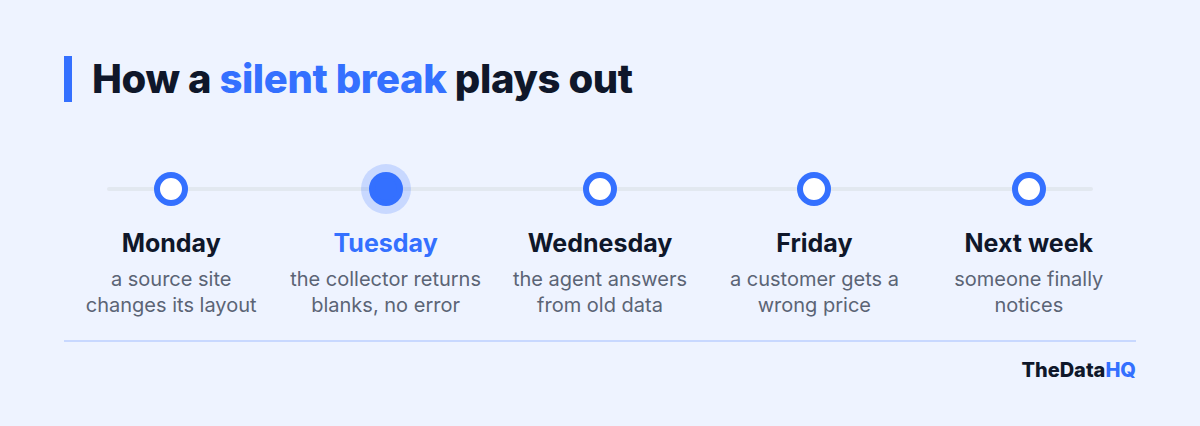
Because an agent acts on what it reads, and it won't tell you the data is old. A report with last week's prices looks dated. An agent with last week's prices just answers, confidently and wrongly.
We've written about this failure in detail: when a collector breaks, stale data in an AI pipeline (the chain of steps that feeds data to the AI) rarely causes an error. The agent keeps answering from the last good copy.
How often should the data update?
Match the update to how fast the fact changes, not to the fastest option on offer:
- Hourly: prices and stock during sales, travel fares, auctions.
- Daily: most prices, property listings, job postings.
- Weekly: company details, store locations, product catalogs.
- Monthly or once: reference data that barely moves.
Whatever you choose, get it in writing. A provider who says "real time" should also say what happens when a run fails.
How should the data reach your agent?
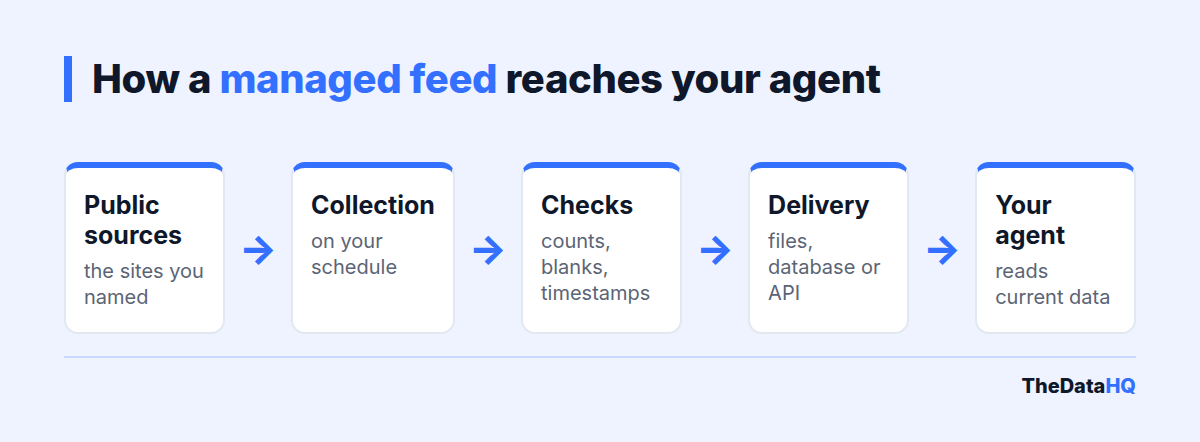
The data can reach the agent in four common ways. Choose the one your team already uses, not the newest.
Through an API
An API (a web address your software calls to fetch data) lets the agent ask for records when it needs them. It suits agents that look up one product or one company at a time.
Through MCP
MCP, the Model Context Protocol, is an open standard for plugging AI apps into tools and data. Some providers now offer an MCP server, so an agent can query the data without custom code. It's worth asking about, but it's a delivery choice. It doesn't make the data fresher or more accurate.
Through files, a database or a warehouse
A scheduled file drop (JSON, CSV) or rows written into your database is the plainest option. Your agent reads from your own copy. If the provider has a bad day, your agent still has yesterday's data and you can see its date.
Who fixes the feed when a website changes?
This is the question that decides the real cost, and the one most provider pages skip. Websites change their layout without notice, and a collector that worked yesterday returns blanks today.
- With a self-serve API, your team notices, works out what broke and fixes the parsing.
- With a business-data API, the provider fixes its own data, but you can't add a source it doesn't cover.
- With a managed feed, fixing breaks is the provider's job. Ask how they find out.
Our answer: we monitor our scrapers, so in most cases we spot a break before you do. Fixes for site changes are included in a retainer at no extra charge. On a fixed-price project, we agree a support window up front.
How do you choose a live web data provider? A 10-point checklist
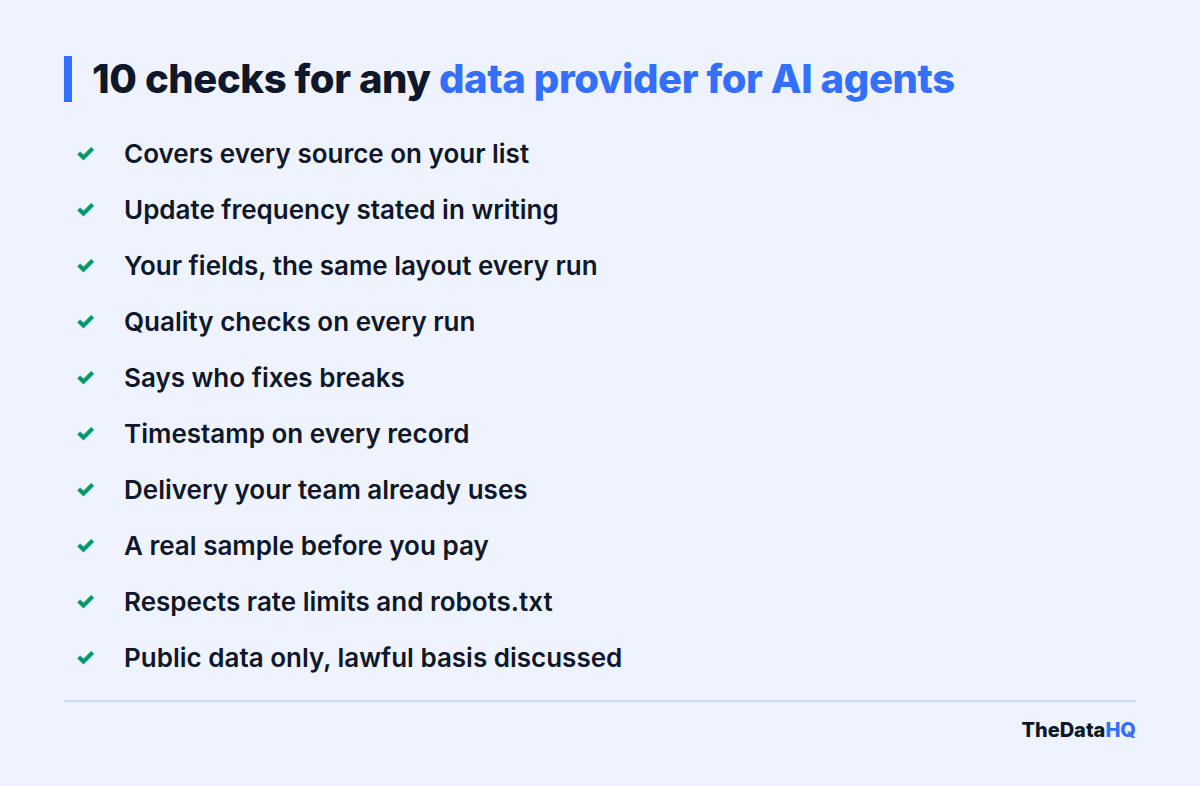
Run any provider through these ten points before you sign. A good one answers each in a sentence.
| # | Check | A good answer sounds like |
|---|---|---|
| 1 | Sources covered | "Every site on your list, and here's a sample from each." |
| 2 | Update frequency | "Daily by 6 a.m. Eastern, stated in the agreement." |
| 3 | Fields and format | "Your field list, your names, the same layout every time." |
| 4 | Quality checks | "Row counts and empty fields checked on every run." |
| 5 | Who fixes breaks | "We do, and we watch for them." |
| 6 | Timestamps | "Every record carries the time it was collected." |
| 7 | Delivery | "Files, your database or an API: your pick." |
| 8 | A real sample first | "Here's real output from your URL, free." |
| 9 | Respecting site limits | "We follow rate limits and robots.txt, and back off when asked." |
| 10 | Personal data | "Public data only, and we'll talk through your lawful basis." |
Point 9 matters more than it looks. robots.txt is the file where a site states what automated visitors may collect. A provider that brags about getting past a site's defenses is a legal risk you take on.
What does a live data feed for AI agents cost?
There's no list price, because two feeds rarely cost the same. Self-serve APIs charge per request or per page; managed feeds are quoted per project or per month.
At TheDataHQ, a one-off dataset is a fixed price per project and an ongoing feed is a weekly or monthly retainer. Both are quoted after a free sample. Our pricing page explains how a quote is built.
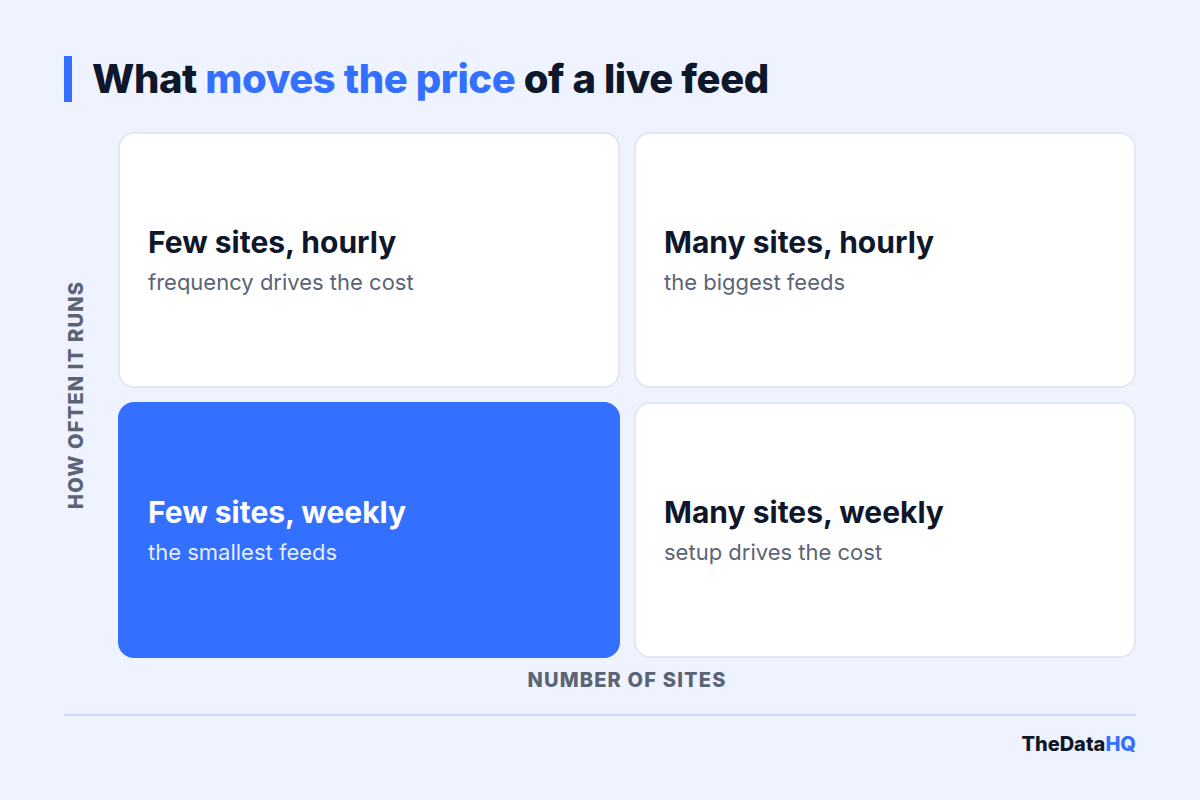
What moves the price?
- The number of sites, each with its own layout.
- How often it runs: once, or refreshed hourly.
- How the site is built: plain pages, or pages drawn in the browser by code.
- Volume: thousands or millions of pages.
- The fields and the cleaning: six fields or sixty, made consistent across sources.
- Ongoing maintenance: included in a retainer, an agreed window on a fixed price.
Watch the cost that never shows on a quote: your team's time. A cheap API that breaks every fortnight can cost more than a feed someone else maintains. It also helps to keep the feed narrow. Gartner predicts that over 40% of agentic AI projects will be canceled by the end of 2027, citing rising costs and unclear business value.
Should you build the feed in-house or buy it?
Build it if collecting this data is part of your product and you have engineers to spare. Buy it if the data is an input and your team should be working on the agent itself.
- Building gives you full control, but you own every break, every new source and every 2 a.m. failure.
- Buying costs a monthly fee, but someone else watches the sources and the checks.
- Running a tool yourself sits in between. We built one for clients, and most of them would rather we ran it.
If you do want to build the collection side in-house, our sister company BinaryBits has a guide to data sources for AI agents from the engineering side.
What does US law ask of you?
Collecting public web data is often lawful in the US, but "it's public" isn't the whole test. This is a plain-English summary, not legal advice.
- Computer access law: in hiQ Labs v. LinkedIn (2022), the Ninth Circuit said collecting pages anyone can see likely isn't "without authorization" under the CFAA, the federal anti-hacking law. Pages behind a login are a different matter.
- Contracts: a site's terms can still bind you. hiQ later lost on breach of contract, so terms matter even when the CFAA doesn't apply.
- Personal data: if the feed includes people's details, the California Consumer Privacy Act and other state laws apply. For UK or EU residents, UK GDPR and GDPR need a lawful basis.
- Copyright and database rights: facts are rarely protected, but large copied text can be.
We collect public data only, nothing behind logins or paywalls. If personal data is involved, we'll ask about your lawful basis before we start.
What did a real project look like?
One past project, from our anonymised case studies: a client needed documents collected from many websites and sorted into categories for an AI system. We collected over 2.7 million documents, and the classification reached 99% accuracy.
That's a past result, not a promise for your sources. It does show the shape of a managed feed: the client named what they needed, we ran the collection and checks, and they got labeled data in the format their pipeline expected. Across all our work, we've delivered 260+ projects over 12 years, from more than 10,000 websites.
The honest limit: a managed feed is slower to start than a self-serve API. Expect to agree sources and fields before the first delivery, while a self-serve API works in minutes.
Want to see what a feed for your agent would look like? Send us one URL and the fields you want, and we'll send back a free sample of the real output, usually around 100 rows, and quickly. No charge, no commitment. Request your free sample, or read how our AI data scraping service works.
Frequently asked questions
What does a data provider for AI agents do?
A data provider for AI agents supplies the current facts an agent can't know on its own, such as prices, listings, jobs or company details. Some sell records from their own database, some fetch web pages on request, and managed providers collect, check and deliver the fields you choose on a schedule, ready for the agent to read.
How much does live web data for AI agents cost?
It depends on the number of sites, how often the data updates, how the sites are built, the volume and the fields you need. Self-serve APIs charge per request. Managed feeds are usually a fixed price for one-off work or a monthly retainer for ongoing data. At TheDataHQ, both are quoted after a free sample.
Should I build a data feed in-house or outsource it?
Build it in-house if collecting the data is core to your product and you have engineers to keep it running. Outsource it if the data is just an input to your agent. With a managed feed, the provider watches the sources, fixes breaks when sites change and checks every run, so your team can work on the agent.
How fresh does data for an AI agent need to be?
As fresh as the fact it describes changes. Prices during a sale may need hourly updates; most prices, listings and jobs are fine daily; company details can be weekly. Whatever the schedule, make sure every record carries the time it was collected, so the agent and your team can see how old it is.
What's the difference between a web data API and a managed data feed?
A web data API fetches a page when your software asks and returns its content; your team handles the parsing, checks and failures. A managed data feed delivers the fields you named, from the sites you named, on a schedule, and the provider keeps it working. The API suits one-off pages; the feed suits the same sources every day.
Is it legal to feed scraped web data to an AI agent in the US?
Often yes for public pages, but it depends on the details. Courts have said collecting public pages likely isn't hacking under the CFAA, yet site terms can still bind you, and personal data brings in the CCPA and other state laws. Avoid anything behind a login. This isn't legal advice; check your use case with a lawyer.