How to Extract Data from a Website to Excel or CSV in 2026
You can pull a web page into a spreadsheet without writing code, and the tool is usually already on your computer. The five point-and-click methods, which pages defeat every one of them, and what a purpose-built extractor adds when they stop working.
By Vinay Jakhariya, Co-founder & Operation Manager · · 14 min read
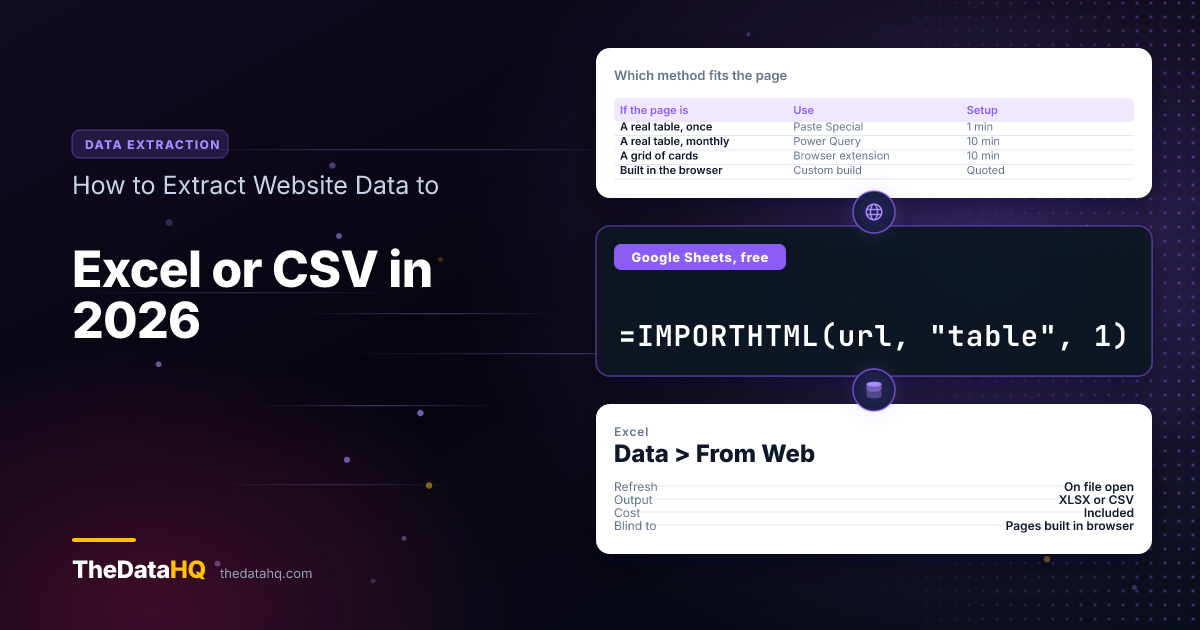
Yes, you can pull data off a web page into Excel or CSV without writing a line of code, and for most pages the tool is already on your computer. Excel's Power Query reads tables straight off a page and refreshes them on a timer. Google Sheets does the same job for free with a single formula. Both stop dead on sites that build their pages in your browser, which is most large sites now, and that's the point where a purpose-built extractor pays for itself.
Here are the five methods, what each one actually gets you, and how to tell in a minute which one your page needs.
Can Excel Pull Data from a Website?
It can. Excel for Windows has had a web connector built in since 2016, under Data > Get Data > From Other Sources > From Web. You paste a web address, Excel shows you every table it found on that page, and you pick the one you want.
The engine behind it is called Power Query, which is Microsoft's name for the "get data from somewhere else and tidy it up" part of Excel. You don't install anything. It's the same menu you'd use to open a CSV.
What it can't do is read a page the way you read it. That distinction runs through everything below, so it's worth getting straight early.
What Are the Ways to Extract Data from a Website to Excel?
Five, in rough order of effort:
- Copy and paste - fine for one table, once.
- Excel's Power Query - for tables that need to stay up to date.
- Google Sheets import formulas - free, and works on a Chromebook or a phone.
- A browser extension - for lists that aren't laid out as a table.
- Power Automate Desktop - for pages you have to click through first.
All five are point-and-click. None needs a developer. And all five share one limit, covered further down.
How Do You Copy Website Data to Excel by Hand?
Select the table on the page, copy it, then in Excel use Paste Special > Text rather than a plain paste. Plain paste drags the page's formatting, images and hidden links in with it.
When does copy and paste work?
When all three of these are true:
- The data is already a real table on the page, with header cells
- It fits on one screen, or a few pages you're willing to click through
- You need it once, and nobody will ask for it again next month
That's a narrower set than people expect, but when it fits, it takes forty seconds and nothing beats it.
What goes wrong when you paste a web page?
Four things, every time:
- Numbers arrive as text. A price like "£1,299.00" lands as a word, so your SUM returns zero.
- Merged cells. A page that uses a table for layout produces a spreadsheet you can't sort.
- Everything in one column. If the page isn't using a real table, the paste has nothing to split on.
- It's a snapshot. Tomorrow's prices need the whole job doing again.
How Do You Extract Data from a Website to Excel Automatically with Power Query?
This is the one worth learning. It's ten minutes once, and after that the file updates itself.
What is Power Query?
Power Query is the part of Excel that remembers where data came from and what you did to it, so it can do the whole thing again on command. Rename a column, drop a row, split a field, and it records each step to replay against fresh data.
That memory is the difference between a spreadsheet and a report. You set it up once in January and it's still right in June.
How do you set it up?
- Open Excel and go to Data > Get Data > From Other Sources > From Web.
- Paste the page address and press OK.
- In the panel that opens, Excel lists each table it found as
Table 0,Table 1and so on. Click each to preview it. - Pick the right one and choose Transform Data, not Load. Loading straight in skips the cleanup.
- In the editor, promote the first row to headers, delete the columns you don't want, and set number and date columns to the right type.
- Choose Close & Load. The table drops into your sheet.
To get a CSV out, use File > Save As and pick CSV UTF-8. The UTF-8 version is the one that keeps accents and currency symbols intact.
How do you make it refresh on its own?
Go to Data > Queries & Connections, right-click your query, choose Properties, and open the Usage tab. Two boxes matter there, both documented by Microsoft:
- Refresh every N minutes keeps a live figure current while the file is open.
- Refresh data when opening the file is the one most people actually want.
One catch worth knowing before you build a process on it: this is a desktop Excel feature, so it only runs while the workbook is open on your machine. Close the laptop and the refreshing stops.
What can Power Query not do?
It reads the page the server sends, not the page you see. Those are the same thing on an old-fashioned site and completely different on a modern one.
So Power Query returns nothing, or a fragment, when:
- The page fills itself in after loading, which covers most large retail, listing and dashboard sites
- The data isn't marked up as a table, even though it looks like one on screen
- More results appear as you scroll instead of on numbered pages
- You have to click a filter or a "show more" button before the rows you want exist
The failure is quiet, which is the dangerous part. You get a table with the right shape and nothing useful in it. We wrote up how to spot that in how to scrape dynamic websites.
How Do You Extract Data from a Website to Excel Free with Google Sheets?
Google Sheets has two formulas that do web extraction with no software and no account beyond a Google one. Pull the result into Sheets, then use File > Download > Microsoft Excel or Comma Separated Values.
How does IMPORTHTML work?
It grabs the nth table or list on a page. One formula, three parts:
=IMPORTHTML("https://example.com/report", "table", 1)The last number is which table on the page you want, counting from one. If the first guess comes back wrong, try 2, then 3. That's genuinely the method.
How does IMPORTXML work?
IMPORTXML goes after anything that isn't a table: a column of prices, a set of headings, a list of links. It takes an address and an XPath, which is just a way of writing "the thing at this position on the page".
=IMPORTXML("https://example.com/products", "//h2[@class='title']")You don't have to compose that by hand. In Chrome, right-click the item you want, choose Inspect, then right-click the highlighted line and pick Copy > Copy XPath. Paste it into the formula between quotes.
What are the limits of the import formulas?
Three, and Google documents all of them:
- They refresh hourly, while the document is open. Not on demand, and not overnight.
- There's a shared quota. The limit counts across every spreadsheet on your account, so a busy sheet can break a quiet one you set up months ago.
- They can't see pages built in the browser, the same wall Power Query hits.
In practice a dozen import formulas in one sheet is where things get unreliable. Past that, the formulas start returning errors that clear themselves and come back.
Is There a Chrome Extension to Extract Data from a Website to Excel?
Several, and they solve a specific problem the two methods above can't: data that isn't a table. A product grid, a directory of cards, a search results page. An extension lets you click one item, click a second, and it works out the pattern for the rest.
What they're good at:
- Lists laid out as cards or tiles rather than rows
- Pages where you pick fields by clicking them, with no formula to write
- A one-off export to CSV in under five minutes
Where they stop:
- They run in your browser, so the tab has to stay open and your machine has to stay on
- Free tiers usually cap the rows per run, and the cap is lower than people expect
- A layout change breaks the selection and there's no warning, just fewer rows
- They read whatever's on the page, including the "from £12" placeholder that isn't the real price
How Do You Extract Data from a Website to Excel Using Power Automate?
Power Automate Desktop, which ships free with Windows 11, has an action called Extract data from web page. You open the page inside its recorder, highlight the first two values you want, and it offers to take the rest, including following "next page" links on its own.
It's the right pick when the job needs steps before the data appears:
- Choose a region from a dropdown, then read the table
- Walk through forty pages of results without clicking forty times
- Save the result into an existing Excel file on a schedule
The trade-off is that it drives a real browser window on your desktop. It's slower than a formula, it needs the machine awake, and it puts a window on screen while it works.
What About No-Code Web Scraping Tools?
If you search this topic you'll meet a category of hosted products: Octoparse, ParseHub, Apify, Browse AI, Import.io and a long tail of newer ones. We're not ranking them here and we don't have a favourite to sell you.
What's worth knowing is the shape they share. You point at a page, click the fields you want, and the product runs the collection on its own servers on a schedule, then hands you an Excel or CSV file. That solves the "my laptop has to stay on" problem, which is the real limit of every method above.
What they don't solve is the one that actually costs you money: nobody is watching the output but you. When a site changes its layout, a self-serve collector keeps running and keeps producing files. The files are just wrong, and you find out when someone downstream asks why a number moved.
Which Method Should You Use?
Match the method to the page, not to the budget:
| If the page is | Use | Time to set up |
|---|---|---|
| A real table, needed once | Copy and Paste Special | 1 minute |
| A real table, needed monthly | Excel Power Query | 10 minutes |
| A real table, and you're on Sheets | IMPORTHTML | 2 minutes |
| Not a table, but a simple layout | IMPORTXML | 15 minutes |
| A grid of cards or tiles | A browser extension | 10 minutes |
| Behind a dropdown or 40 pages | Power Automate Desktop | 30 minutes |
| Built in the browser, or large | A purpose-built extractor | See below |
Work down that list and stop at the first row that fits. Most people reach for row seven when row two would have done.
How Do You Extract Data from a Website with a Login to Excel?
This is a common search, and the honest answer is that the method isn't the question. Data behind a sign-in belongs to somebody, and the terms you agreed to when you made the account usually say what you may do with it.
Three routes are clean:
- The export button. Most business accounts already have one, filed under Reports or Settings. It's the fastest answer and people miss it constantly.
- The official interface. If the service publishes a supported way for customers to pull their own records, that's it, and it won't break when the site is redesigned.
- Ask. A written agreement with the site owner covers you, and for a supplier or a partner it's usually a five-minute conversation.
What we won't help with is automating a sign-in to a service that hasn't agreed to it. That's not squeamishness about the technique. It's that the resulting file is one you can't use in a business you can defend.
Why Do the Free Methods Fail on Complex Websites?
Because all five read a page that's already finished, and a lot of pages aren't finished when they arrive. The page turns up as an empty frame plus a small program, and the program fetches the actual content a moment later.
Which sites break them?
- Anything where results appear a beat after the page does
- Anything with filters down the side that change the list without reloading
- Anything that loads more rows as you scroll
- Anything where the same address shows different results to different people
- Anything that asks you to confirm you're a person before it shows you anything
There's a one-minute test. Right-click the page, choose View page source, and search that text for a price or a name you can see on screen. If it isn't in there, the page was assembled in your browser, and Power Query and IMPORTHTML will both come back empty.
When Do You Need a Custom Data Extraction Tool?
When the answer has to be right without you checking it. That's the real line, and it isn't about how technical the site is.
Four signals, and one is enough:
- Volume. Thousands of pages, or dozens of sources feeding one sheet.
- Schedule. The file has to land every morning whether or not anyone opens a laptop.
- Consequences. Somebody prices, orders or reports off this file.
- Structure. Records that need matching, de-duplicating or joining to what you already hold before they're usable.
What does a custom build include?
The collection is the small part. What you're buying is everything around it:
- Collection that runs on our machines, on your schedule, with nothing open on your desk
- Checks that compare today's file against yesterday's and raise a flag when a column empties or a count halves
- Cleanup built in, so you get one date format, prices as numbers, and duplicates resolved before the file reaches you
- The file where you need it: an Excel or CSV drop, a shared folder, or straight into your own system
- Somebody who fixes it when the site changes, which it will
That last one is the whole argument. Every method on this page has the same failure: it breaks silently and keeps producing files. Custom data extraction is really a promise that a person notices.
How much does a custom extraction tool cost?
It depends on the site and the schedule, so we quote per job rather than publish a rate card that would be wrong for most of them. Four things move the number:
- How many sources, and how differently each one is built
- How often it runs, since a monthly pull is a different job from an hourly one
- How much cleaning and matching happens before you get the file
- Whether you want a one-off build or an ongoing feed we keep working
The detail is on what moves the price, and if you'd rather skip the reading, tell us what you need and we'll come back with a scope and a figure. If you're weighing a build against a subscription, we set the two side by side in run the scraper or buy the feed.
How Do You Keep the Excel or CSV File Clean?
Whichever method you land on, the extraction is half the job. Five habits save most of the pain:
- Save as CSV UTF-8, not plain CSV. Plain CSV mangles accents, currency symbols and anything non-English.
- Set column types before you load, not after. Power Query's editor is the right place; fixing text-that-should-be-numbers later is slower.
- Keep a date column recording when each row was collected. Without it you can't tell a stale row from a current one.
- Never overwrite the raw file. Extract to one sheet, work in another. When something looks wrong you'll want the original.
- Check the row count every run. A count that halves overnight is a broken collection, not a quiet week.
Is It Legal to Extract Data from a Website to Excel?
Reading a public page is not, in itself, unlawful in the UK or the EU. But "it's public" isn't the test people think it is, and three separate things apply whatever method you used:
- The site's terms. They bind you whether or not the data is public, and plenty of them restrict bulk copying.
- Database right. In the UK and EU, a compiled collection can be protected in its own right, separately from copyright. A directory is the textbook case.
- Data protection. The moment a record names a person, it's personal data, so you need a lawful basis and you owe that person a notice, even though you collected it from a public page.
Business-level facts carry far less of this than person-level ones, which is why most commercial work stays at the business level by design. None of this is legal advice, and if the answer matters to your business, get it from a solicitor rather than a blog.
Questions People Ask About Extracting Website Data to Excel
Can Excel pull data from a website?
Yes. Excel for Windows has a built-in web connector at Data > Get Data > From Other Sources > From Web. Paste an address and Excel lists every table it found on that page for you to pick from. It works on pages that deliver their content ready-made. On sites that build the page in your browser after loading, it returns an empty or partial table.
How do you extract data from a website to Excel automatically?
Set the page up as a Power Query connection, then open Data > Queries & Connections, right-click the query, choose Properties, and on the Usage tab tick "Refresh data when opening the file" or "Refresh every N minutes". The file then updates itself. One limit: this is a desktop Excel feature, so it only runs while the workbook is open on your machine.
Can you extract data from a website to Excel for free?
Yes, three ways. Power Query is included with Excel at no extra cost. Google Sheets does it free with IMPORTHTML or IMPORTXML, and downloads to Excel or CSV afterwards. Power Automate Desktop ships free with Windows 11. Browser extensions have free tiers too, though they usually cap how many rows you can take in one run.
How do you extract data from a website to Excel using Power Automate?
Use Power Automate Desktop's "Extract data from web page" action. Open the page in its recorder, highlight the first two values you want, and it works out the pattern for the rest and offers to follow the "next page" links. Send the output to a CSV or an existing Excel file. It's the best free option for pages where you have to click something before the data appears.
Is there a Chrome extension to extract data from a website to Excel?
There are several, and they handle the case the formula methods can't: data laid out as cards or tiles instead of a table. You click two example items and the extension finds the rest, then exports to CSV. The trade-offs are a row cap on free plans, a browser tab that has to stay open, and no warning when a layout change breaks the selection.
How do you extract data from a website with a login to Excel?
Check for an export button first, usually under Reports or Settings. Most business accounts have one and it's the fastest route. If there isn't one, ask whether the service publishes a supported way for customers to pull their own records, or get written agreement from the site owner. Automating a sign-in to a service that hasn't agreed to it puts you on the wrong side of the terms you accepted.
How do you extract data from a website to Excel using Python?
Python gives you control the point-and-click methods don't, but it's a genuine project: you write the collection, handle the pages that load late, schedule it somewhere that stays on, and maintain it when the site changes. For a non-developer it's rarely the shortest path. If you've reached the limits of Power Query, commissioning a build usually costs less than learning to write and maintain one.
How do you copy website content to Excel?
Select it on the page, copy, then in Excel use Paste Special > Text rather than a plain paste. That strips the page's formatting and images, which are what turn a paste into a mess of merged cells. Expect numbers to arrive as text, so set the column type afterwards or your totals will come out as zero.