How to Get Google Maps Business Data: The Four Routes, and What Each One Costs
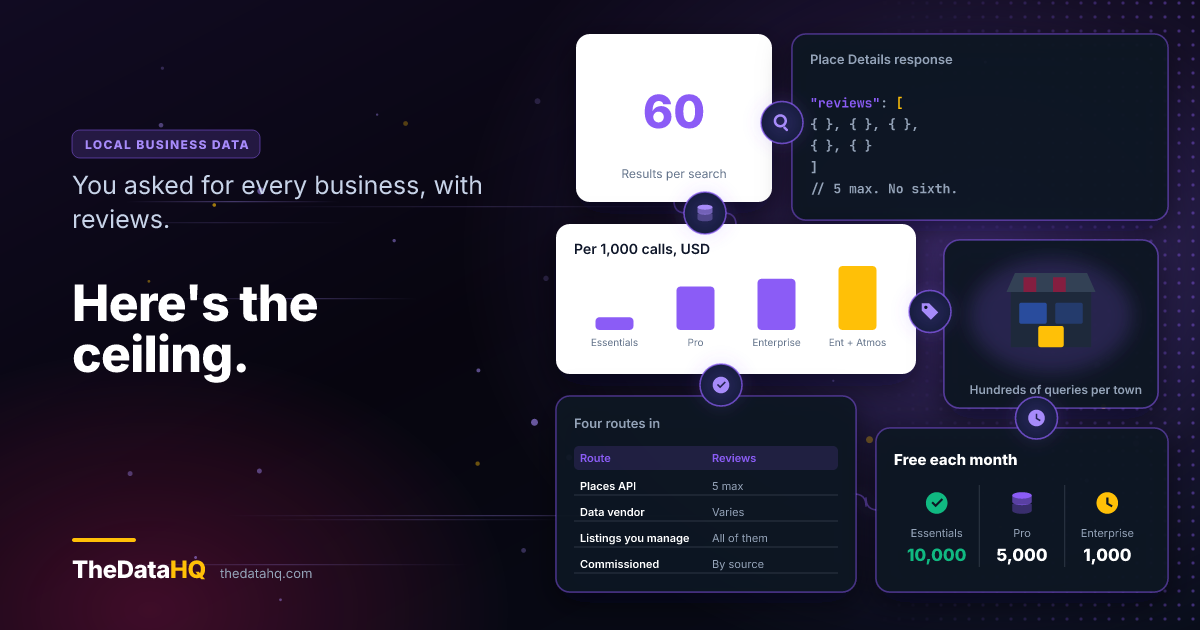
One search returns 60 businesses. The licensed route returns 5 reviews each, for about $25 per 1,000. Here are the four routes to local business data, what each one gives you, the clause every vendor quotes at you wrongly, and how to tell whether you actually got everything.
By Vinay Jakhariya, Co-founder & Operation Manager · · 11 min read
A client sent us this last week:
"I want to collect the buisness data from google maps for specific location and with reviews. I want those data to use for my telecommunication and survye puprose"
We get a version of that most months, and it's a perfectly reasonable thing to want. This post is about the first half of it - getting the data, for one place, with the reviews attached. What you're then allowed to do with a business phone number is a separate subject with its own rules, and it deserves its own post rather than a paragraph tacked onto this one.
The collection half runs into two walls that no tool vendor mentions on a pricing page. Both are numbers. Sixty and five. Here's where they come from, and what each route hands you once you know about them.
The Four Routes, and What Each One Gives You
There are four ways to get local business data. Everything you'll be sold is one of these wearing a different coat.
| Route | What you get | Reviews | Cost |
|---|---|---|---|
| License the Places API | Up to 60 businesses per search, structured | 5 per business, fixed | ~$25 per 1,000 with reviews |
| Buy records from a data vendor | Whatever they hold, however old it is | Varies, usually a count not the text | Per record, per refresh |
| Work the listings you manage | Only your own locations | All of them, paginated | Free |
| Commission collection from sources that permit it | The fields you asked for, from sources chosen for the job | Depends entirely on the source | Project or retainer |
Most people asking the question assume they're in route one and find out they wanted route three. A few genuinely need route two. The ones whose requirement the caps won't fit end up at route four, and that's the one we do. The rest of this is how to tell which you are.
Sixty Results, Not Six Hundred
Here's the first wall, in Google's own words. The Places API documentation says Text Search "returns a maximum of 60 results across all pages, although this limit is subject to change." Twenty per page, three pages, then it stops.
That number doesn't care how many businesses are actually there. "Every restaurant in Manchester" isn't a query - it's a few hundred queries, sliced by category and postcode district until each slice comes back under sixty. Get the slicing wrong and you'll never know what you missed, because a truncated result set looks exactly like a complete one.
So the first thing to price isn't the data. It's the gridding. That's the part that turns a Tuesday afternoon into a fortnight, and it's the part that gets left out of every quote we're asked to beat.
Five Reviews, Sorted by Relevance
The second wall is the one that ends most projects. The Places API reference is blunt about it:
"List of reviews about this place, sorted by relevance. A maximum of 5 reviews can be returned."
Five. Not five per page - five, full stop. There's no pagination parameter and no sort you can pass to get a sixth. Developers have been asking for one on Google's public issue tracker since 2015 and it's still open.
If you wanted a review corpus - sentiment over time, what customers complain about by area, how a chain's branches differ - five relevance-ranked reviews per business won't get you there. They're not even a random sample. They're the five Google thinks are most useful, which is close to the opposite of a sample.
That's the honest answer and we're not going to dress it up. If your project needs the review text at volume from listings you don't own, the licensed route can't do it, and we'd rather tell you that now than three weeks in.
What five reviews are good for: a rating and a recency check. Is this place still trading, is it rated well enough to bother with, has anyone said anything at all in the last year. For sorting a long list into a shortlist, that's often all you needed.
What It Actually Costs, From the Price List
Now the part the category gets wrong, and gets wrong in a direction that happens to suit it.
Google publishes the price. Place Details, per 1,000 calls, in the first volume band: $5.00 for Essentials, $17.00 for Pro, $20.00 for Enterprise, and $25.00 for Enterprise + Atmosphere. Reviews live in that last one. There's a free monthly allowance on each tier too - 10,000 calls on Essentials, 5,000 on Pro, 1,000 on Enterprise.
Work it through for two thousand businesses in one city, with reviews:
- Discovery, say 120 sliced searches paginated three deep - about 360 Text Search calls, inside the free Pro allowance. Nothing.
- Details with reviews, 2,000 calls at $25 per 1,000. The first 1,000 are free on the Enterprise allowance, so you're billed for 1,000.
- Total: about $25.
Twenty-five dollars. Not twenty-five hundred. The most-cited pricing breakdown on this query quotes $32, $35 and $40 for those same three tiers, which doesn't match Google's published schedule - and that gap matters, because "the official route is too expensive" is the premise nearly every tool on this search page is sold on. It isn't expensive. It's capped. Those are different complaints and only one of them is true.
One thing that $25 doesn't buy you is the right to keep it. The Places policies are explicit: "You must not pre-fetch, cache, or store Places API content beyond the allowed exceptions." Place IDs are carved out - you can hold those forever - but the business record you paid for isn't a record you own. Budget for re-fetching, not for a database. That's a running cost, and it's the one people forget when they compare this against how we price collection work.
The Clause Everyone Quotes, and the One That Bites
Every "is this legal" page on this topic quotes the same sentence from Google's Maps and Earth Additional Terms, currently effective 27 January 2026. It's the one that lists the forbidden outputs, and it does name what our client wanted:
"use Google Maps to create or augment any other mapping-related dataset (including a mapping or navigation dataset, business listings database, mailing list, or telemarketing list) for use in a service that is a substitute for, or a substantially similar service to, Google Maps"
Read the end of it. The prohibition is tied to building something that substitutes for Maps. So the obvious defence - "I'm not building a rival map, I just want a list of plumbers" - has real force against that clause.
The trouble is it's the wrong clause to be defending against. A few lines up, in the same list, sits this:
"mass download or create bulk feeds of the content (or let anyone else do so)"
No qualifier. Nothing about substitute services, nothing about what you intend to do with it afterwards. And "or let anyone else do so" reaches the arrangement where you didn't do the downloading yourself but you're the reason it happened.
We're not going to tell you how a court would read either sentence, and this isn't legal advice. What we will say is that a vendor who quotes you the first clause and stops has shown you the half of the page that helps them. Read both. Credit to Thunderbit here - they sell an extraction tool, and their piece on this quotes both clauses and still ends up recommending the official API.
The One Route That Returns Every Review
If what you actually wanted was all the reviews, there is a route that gives you all the reviews. It's just narrower than people hope.
The Google Business Profile API returns reviews for locations you've verified and manage - paginated, around fifty per page, as many pages as there are reviews. Full text, ratings, replies, the lot. It costs nothing.
The catch is in the word "manage". It works for your own listings and nobody else's. So it's no use for prospecting, and it's the correct answer if you run forty branches and someone's asked you to track what customers are saying across all of them. We don't sell that. You don't need us for it. If that's your question, go and read the endpoint documentation and you'll be done this afternoon.
Route Four: When the Caps Don't Fit the Question
So you've read the first three and none of them covers what you were asked for. That's route four, and it's the work we do.
Worth being exact about what it is and isn't. For the listings this post has been about, routes one to three are the answer and the terms quoted above are why - route four isn't a fourth way into the same place. It's what happens when the question turns out to be bigger than one source: when the fields you need live somewhere else entirely, and the job is working out where.
It starts with a question the tool vendors never ask you: which source. Not "can we get it" - every one of them can get something. The question is which sources carry the fields you need, what their terms actually permit, and whether the answer survives being looked at by your own lawyer in six months. Sometimes that's an official API nobody told you existed. Sometimes it's a public register, a regulator's filing list, a trade body's membership roll. Often it's several, reconciled against each other, because one source rarely has everything and the disagreements between two sources are how you find the errors in both.
Then the parts that aren't the extraction at all:
- Coverage. Proving you got everything, not just something. This is the gridding problem from earlier, and it's the one that quietly ruins projects - a truncated result set looks exactly like a complete one.
- Deduplication. The same business under three spellings, two phone numbers and an old trading name - and no field that reliably tells you they're the same business.
- Delivery. Into the shape and the system that already reads it - a file, a database, an endpoint - rather than a CSV somebody reformats by hand every month.
- Keeping it true. Business data decays. A one-off file is a snapshot of a week that's already gone.
What we won't do is take a job that needs getting round a site's access controls, or one where the source's terms say no. We'll tell you that at the quote stage, not after you've paid - it's written into what we'll turn down, and it's why the first conversation is about sources rather than about scrapers.
If your requirement has outgrown the caps, that's the kind of collection work we build, and what we do with it once it's collected. What it costs depends mostly on how often it has to refresh.
How Do You Know You Got Everything?
This is what separates a usable extract from a pile of rows, and it's the question nobody selling you an export will answer.
Go back to the sixty. Every search returns at most sixty results, and a search that came back with exactly sixty is telling you something it can't quite say out loud: there may be more. A truncated result set and a complete one look identical. Same columns, same shape, no error, no warning. You find out months later, when someone asks why their own branch isn't in the file.
So completeness isn't something you check at the end. It's something you build into how you slice:
- Slice until nothing hits the cap. A slice that returns sixty isn't finished - cut it finer, by category, by postcode district, by street where a city centre is dense enough to need it. A run where no slice touches the ceiling is the closest thing to a coverage proof you'll get.
- Count against a second source. You can't check a total you don't have. You can check two sources against each other, and where the counts disagree, one of them is wrong - the disagreement tells you where to look.
- Watch the overlap. Neighbouring slices should share a few records at the edges. If two adjacent slices have nothing in common, there's a seam in your grid and things are falling through it.
None of that proves you got everything. It bounds how much you could have missed, which is a weaker claim and an honest one. Anyone who tells you a local extract is complete is telling you something they have no way of knowing.
It's also the right question to put to a vendor before you buy: not how many records they hold, but how they'd know if some were missing. What a directory extract actually returns covers the rest of it - what arrives empty, what arrives twice, and how fast it goes out of date.
Which Route You're Actually In
Four questions, and they settle it.
Are the listings yours? Route three. It's free, it returns every review, and you can stop reading.
Do you need coverage of one place, with a name, a number and a rating, to work through? Route one. It's cheap, and the work is in the gridding and the proving rather than the extraction. Price those two and you'll have a realistic number.
Do you need the review text at volume from businesses you don't own? Not route one, and no amount of budget moves you into it. Either the project narrows to ratings and recency, or it's route four and the question becomes which source carries what you need.
Do you need fields the API doesn't expose, coverage it won't confirm, or a file you're allowed to keep? Route four, and that's a conversation about sources before it's a conversation about tooling.
Notice what none of that turned on. The scraper. Pulling a page is the easy part and always was - it's the cheapest hour in the whole project. What you're actually buying is the four things around it: showing the coverage is as complete as anyone can show, reconciling the duplicates, getting it into the shape your systems already read, and keeping all of it true after the week it was collected in. Those are the costs that decide whether this works, and they're the ones no pricing page shows you.
So tell us the fields you need and the use you have in mind, and we'll tell you which of the four it is - send it over and you'll get a straight answer, including when it's the free route you can run yourself this afternoon.